Defend Your Appraisal Adjustments With Market Data
CompShield helps residential appraisers analyze MLS closed-sales data, derive market-supported adjustments, and generate supporting appraisal documentation in minutes.
Stop Relying on Unsupported Adjustments
Reviewers, lenders and clients increasingly expect adjustments to be backed by credible market evidence rather than convention or experience alone. Producing that support by hand — pulling closed sales, cleaning the export, building paired-sales grids and writing up the reasoning — can consume hours on a single assignment.
CompShield takes the data you already export from your MLS and organizes the analysis so the market support behind each adjustment is visible, repeatable, and easy to document in your workfile.
How It Works
Export closed sales from your MLS and upload the CSV.
Enter GLA, lot size, pool, garage, bedrooms, bathrooms and other relevant characteristics.
CompShield evaluates relationships within your market data and produces regression-supported adjustment indications.
Generate organized supporting documentation for the appraisal workfile.
Inside the CompShield Workspace
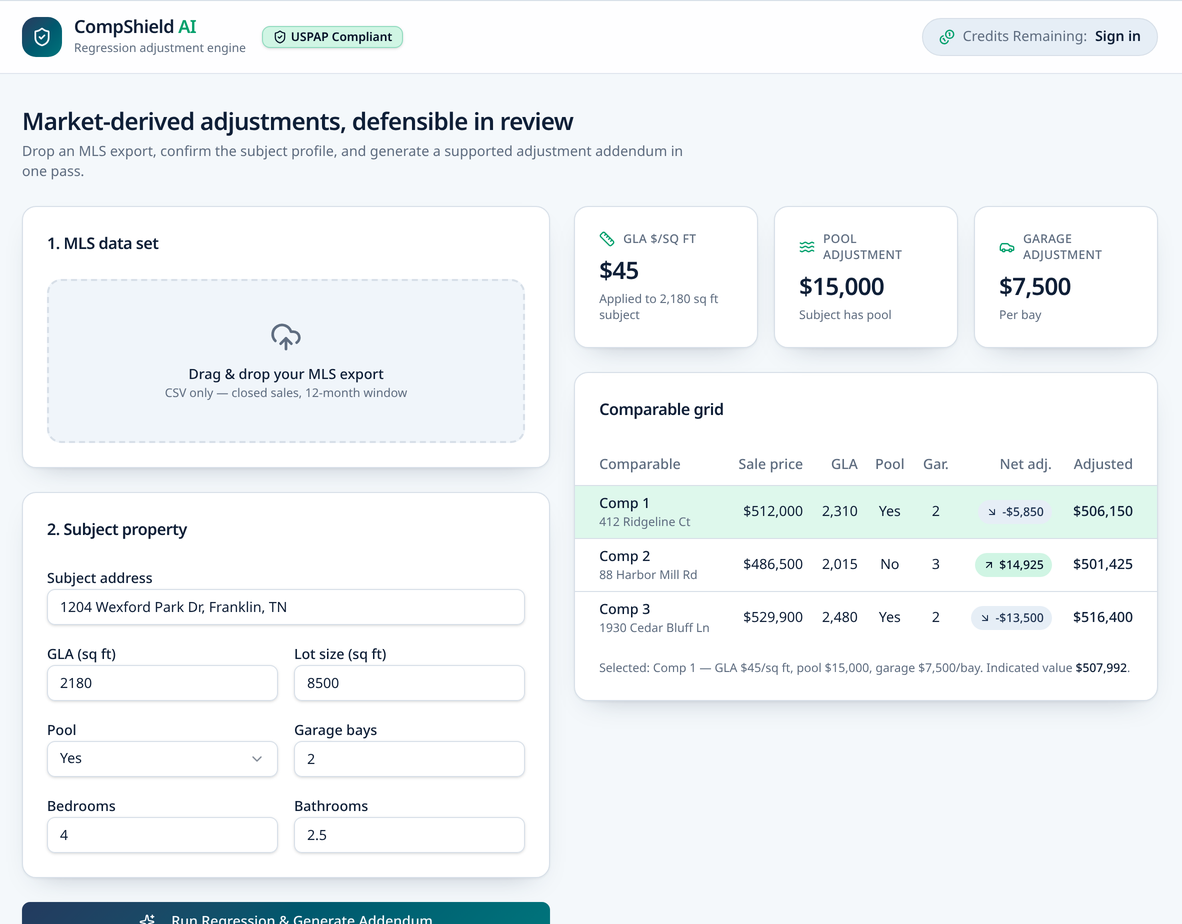
Every analysis produces the same working set: adjustment indications, a comparable grid and a written addendum you can carry into the workfile.
Fictional data · Watermarked “ILLUSTRATIVE SAMPLE — NOT FOR APPRAISAL USE”
GLA adjustment
Dollar-per-square-foot indication derived from your closed sales.
Pool adjustment
Contributory value indication for pool presence.
Garage adjustment
Per-bay indication from garage capacity in the data set.
Comparable grid
Line-item adjustments and adjusted sale prices for each comp.
Addendum / report
Narrative documenting methodology, derivation and reconciliation.
Built for Defensible Appraisal Workflows
Market-derived indications
Based on the appraiser’s selected closed-sales data.
Visible diagnostics
Statistical diagnostics are shown with the results.
Appraiser-controlled conclusions
You control the analysis and decide what to apply.
Workfile documentation
Download organized documentation for your workfile.
Browser-only CSV processing
Raw MLS CSV data is processed locally in your browser.
Professional Responsibility
Designed to support market analysis and appraisal documentation.
CompShield is an analytical support tool and does not replace the appraiser's professional judgment. The appraiser remains responsible for data selection, methodology, analysis, conclusions, and compliance with applicable appraisal standards.
CompShield reports the diagnostics behind each model—including sample size, R², coefficient standard errors, p-values, and confidence intervals—and identifies when the available data does not provide reliable support for a conclusion.
Learn how the analysis worksPricing
Start with free analyses, then choose the plan that matches your assignment volume.
Free
Two analyses to try the workflow end to end.
$29
10 report credit pack — one-time, no subscription.
$69/mo
40 completed reports / month, with full model diagnostics.
Frequently Asked Questions
CompShield accepts CSV exports of closed sales from your MLS. Export the closed-sale set you selected for your market area, including fields such as sale price, gross living area, lot size, pool, garage capacity, bedrooms and bathrooms.
No. CompShield analyzes the data you provide and presents adjustment indications. Selecting comparables, deciding which indications to apply, and reaching value conclusions remain your responsibility as the appraiser.
CompShield evaluates relationships between sale prices and property characteristics in your uploaded data set using regression analysis, and reports the resulting indications for characteristics such as GLA, pool and garage capacity.
Yes. Each analysis can be generated as organized supporting documentation and downloaded as a PDF for your workfile. Saved reports remain available in your report history.
Your MLS CSV is processed locally in your browser and is not uploaded or stored on CompShield’s servers. If you choose to save a completed report, only the subject information, derived adjustment results, and generated documentation are stored securely in your account. You may also run an analysis without saving it.
No. CompShield is an analytical support tool. The appraiser remains responsible for data selection, methodology, analysis, conclusions, and compliance with applicable appraisal standards.
Put Market Support Behind Your Adjustments
Saved analyses stay in your report history.